
What to do when your monitor has no VESA holes

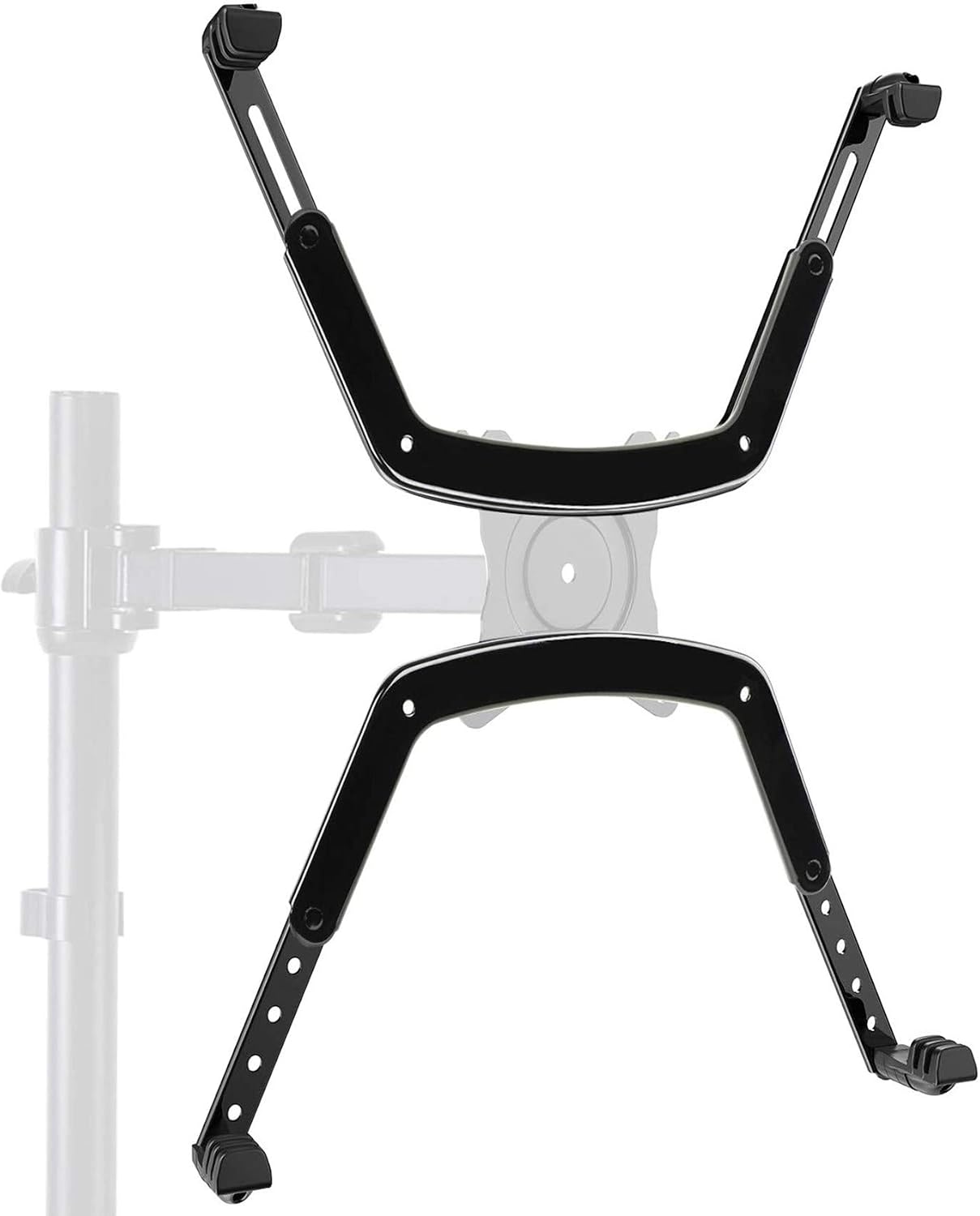
Many users encounter frustration when they discover their monitor lacks VESA holes, which are essential for mounting options. This oversight can limit the flexibility of your workspace and affect ergonomics. Understanding why some manufacturers omit these holes and how to adapt your setup can help you overcome this challenge.
VESA, which stands for Video Electronics Standards Association, provides a standard for mounting monitors. However, some manufacturers choose not to include VESA holes for design or cost reasons. Fortunately, there are solutions, such as adapter brackets, that can help you securely mount your monitor even without these holes.
Why Some Monitors Don’t Have VESA Holes
Manufacturers may omit VESA holes for various reasons related to design aesthetics or cost-cutting measures. Sleeker designs can sometimes take precedence, leading to a lack of mounting options. Additionally, lower-cost models may not prioritize standard features like VESA compatibility, focusing instead on providing the essential functionalities.
Another reason can be the intended use of the monitor. For example, specialized monitors for gaming or unique industrial applications may not require typical mounting solutions. Understanding the manufacturer’s design intentions can help you adapt your workspace effectively.
Understanding Adapter Brackets
Adapter brackets are a practical solution for monitors without VESA holes. These brackets clamp onto the monitor, allowing you to use standard VESA mounts. They provide a secure fit, ensuring that your monitor remains stable and safe while mounted.
When selecting an adapter bracket, it’s crucial to choose one compatible with your monitor’s size and weight. Many brackets feature adjustable designs, allowing a customized fit for various models. This flexibility can help you achieve the ergonomic setup you desire.
How to Measure Your Monitor
Before ordering an adapter bracket, measuring your monitor is essential. Start by noting the dimensions of the monitor, focusing on its width, height, and depth. Accurate measurements will help you select a bracket that fits securely and doesn’t obstruct any essential features.
In addition to dimensions, consider the monitor’s weight. Different brackets have varying weight capacities, so it’s important to ensure that your chosen adapter can handle your specific monitor. This will prevent potential accidents and ensure a stable mounting solution.
Types of Adapter Brackets
There are several types of adapter brackets available, each designed for specific scenarios. Common options include clamp-style mounts, which grip the edges of the monitor, and adhesive mounts, which stick to the back. Understanding the differences can guide you in selecting the right one for your needs.
Popular Adapter Types
- Clamp-style mounts: Securely clamp onto the monitor for stability.
- Adhesive mounts: Easy to apply, but ensure surface compatibility.
- Universal mounts: Adjustable options that fit a variety of monitors.
Each type has its advantages and considerations. Clamp-style mounts often provide a more secure fit, while adhesive mounts may be more straightforward to install. Assess your priorities to find the best match for your situation.
Installing Your VESA Adapter
Once you have selected the right adapter, installation is the next step. Begin by reading the manufacturer’s instructions carefully to ensure a proper setup. Most brackets come with all necessary hardware, making installation relatively straightforward.
Proper installation is critical for safety and functionality. Make sure to tighten all screws and fittings securely. After installation, check the stability of the monitor by gently shaking it to ensure it is firmly attached to the adapter and mount.
Adjusting Your Setup
After mounting your monitor with the adapter, take the time to adjust its position. Ergonomics play a vital role in comfort and productivity. Position the monitor at eye level and at an appropriate distance to reduce strain on your neck and eyes.
Utilizing a monitor arm can enhance your setup further. These arms allow for easy height adjustments and angles, promoting better posture. Combining an adapter with a quality monitor arm can significantly improve your workspace ergonomics.
Maintaining Your Setup
Regular maintenance of your monitor and adapter is essential for longevity. Check the tightness of the mounting hardware periodically to prevent loosening over time. Dust off the adapter and monitor to maintain a clean and professional appearance.
Additionally, keeping cables organized can improve both aesthetics and safety. Use cable ties or sleeves to manage cords, reducing clutter and preventing accidental disconnections. A tidy workspace can enhance productivity and comfort.
The Short Version
When your monitor lacks VESA holes, consider using adapter brackets that clamp securely to your device. Measure your monitor before ordering to ensure a proper fit, and choose a bracket that meets your specific needs. Proper installation and regular maintenance will help create an ergonomic workspace that enhances your productivity.
Understanding the Absence of VESA Holes and Adapter Solutions
Many manufacturers choose to omit VESA mounting holes for reasons ranging from design aesthetics to cost-saving measures. Monitors without these holes often have a sleeker appearance or are designed for specific uses that do not necessitate mounting. However, this can limit versatility for users seeking ergonomic solutions with monitor arms or stands.
When considering VESA adapters, it’s crucial to measure your monitor accurately before ordering. Adapter brackets typically clamp onto the monitor’s frame, and ensuring a proper fit is essential for stability and safety. Take precise measurements of your monitor’s dimensions and the available mounting points to find an adapter that will securely accommodate your needs.
Where to go next
Everything discussed here lives in VESA Adapters. If you are weighing two options and cannot decide, the answers page covers the questions we get asked most, and a message reaches the people who pack the orders.